

When it comes to running webinars that actually move the needle, marketers need a platform that's easy to launch, simple to manage, and tightly connected to the rest of their video and marketing efforts—without the enterprise price tag or steep learning curve. That's where Wistia stands apart.
Goldcast is built for enterprise B2B teams running dozens of events per quarter with six-figure budgets and dedicated ops support. Wistia is built for marketers who want a complete webinar and video platform in one place without the complexity or cost of a platform designed for massive event programs.
Here’s how the two stack up:
Feature breakdown
| Wistia | Goldcast | |
|---|---|---|
| Built for: | Marketers & small and medium-sized businesses (SMBs) looking for a complete webinar & video marketing platform | B2B marketing teams at mid-market and enterprise companies running high-volume webinar and event programs, typically 10 or more events per quarter |
| Ease of use | Simple setup, download-free experience, & intuitive interface with end-to-end control | Clean UI for event setup and strong CSM support to help teams get up and running, but with a significant learning curve |
| Branding | Fully customizable registration pages with video trailers, speaker bios, brand colors, & more | Highly branded event experiences out of the box; consistent branding across webinars, series, and campaigns with minimal per-event setup time |
| SEO | Webinars become searchable and shareable video assets post-event | Content Lab generates SEO-optimized blog posts and social assets from event recordings, but on-demand recordings are often pushed to platforms like Wistia for hosting rather than living natively in Goldcast |
| Analytics | Granular engagement data before, during, and after your event, and integrations that send that data straight to your MAPs | Detailed per-attendee engagement data with HubSpot, Salesforce, and Marketo integration; strong for pipeline attribution, but the analytics dashboards offer limited flexibility for custom reporting |
| Webinars | Webinars that live inside your complete video library, making it easy to host, embed, edit, and reuse content across your site | Built for high-volume B2B webinar programs with networking lounges, breakout rooms, and AI-powered content repurposing via Content Lab; expensive for teams running fewer events |
| Pricing | Flexible webinar add-ons to Wistia's core video platform: $350/mo for up to 500 attendees per session, $750/mo for up to 1,000 attendees, and custom pricing for higher attendance | No public pricing (requires a sales conversation); starts at approximately $12,000/year for an Essentials tier, scaling to $150,000+/year for Enterprise; pricing is based on annual event volume, attendee capacity, and feature tier |
All-in-one Webinar Platform
Streamline Your Webinar Process
Learn moreRegistration & event management
Wistia
From the moment attendees sign up to the final follow-up after your event, Wistia's workflow is streamlined and fully integrated with your broader video and marketing efforts. Within minutes, you can create a branded registration page complete with your logo, speaker bios, and custom visuals without developer or designer help. You can use Wistia's native registration form or embed one from a third-party platform, and either option plugs seamlessly into your marketing stack.
Wistia also makes embedding the full webinar experience on any web page effortless. Attendees can register, tune in live, and come back to watch the replay later through a single permanent link that stays the same throughout the event's lifecycle.
During setup, you have the flexibility to use Wistia's built-in registration form or connect your own custom form that integrates directly with your marketing platform. You can also showcase any video from your Wistia library on the registration page to offer prospects a compelling preview or teaser of what's to come.
After your page goes live, Wistia handles the entire registration process for you. It pushes registration data to your marketing automation tool in real time, recognizes returning visitors through one-click sign-up, delivers reminder emails to registrants, and automatically updates contact records with attendance details.
When the event day rolls around, Wistia's embed options give you the choice between fixed-width and responsive layouts. You can also embed the live video stream alongside interactive features like chat and polls. With embeddable webinars, you're free to host your event anywhere on your site—no developer needed.
Goldcast
Goldcast's registration experience is one of its strengths for teams running recurring events. Your branding carries over automatically from event to event, so you’re not building from scratch every time you spin up a new webinar. Registration integrates with HubSpot, Salesforce, and Marketo at various tiers, and the platform supports custom questions, ticketing, and attendee management for more complex event formats.
For teams running 10 or more events per quarter, Goldcast's repeatable registration workflow is a big time-saver.
Why Wistia wins
Goldcast's registration tools are well-built for high-volume programs where repeatability matters. But for most marketing teams running a handful of webinars per quarter, Wistia's registration experience is faster to set up, easier to customize for each event, and fully connected to your video library and marketing workflows.
You get a complete registration experience from day one, without needing a dedicated CSM to help you configure it.

Going live
Wistia
Wistia simplifies the process of going live. The aim is to empower any team member to manage the full production without needing a dedicated producer standing by.
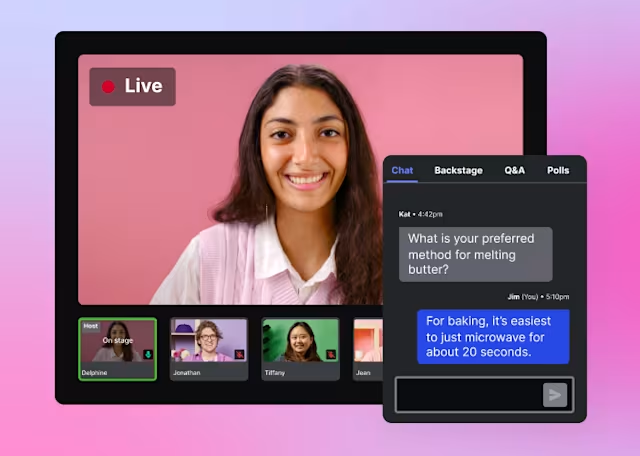
Similar to the registration setup, the main control panel is clean and user-friendly. You can effortlessly move speakers on and off stage, toggle between different screen views, share your screen, add slides or pre-recorded videos without having to screen share, and engage with your audience through live chat, Q&A, and polls.
Want to grow your audience even further? Simulcasting to LinkedIn or other social networks is straightforward.
The backstage area is designed to keep you connected with fellow panelists throughout the event via chat and a dedicated backstage whisper feature. That way, you're never going at it alone and you can coordinate changes in real time. Clear indicators alert you to any network connection problems and confirm when you're visible and audible to the audience, eliminating any guesswork. If going fully live seems intimidating, or you need to connect with audiences across multiple time zones, hosting a pre-recorded webinar is equally simple. Just select a video from your Wistia library, set your desired time, and you're ready to go. The event ends automatically once the video wraps up.
Action item
Goldcast
Goldcast's live event experience is designed to feel like a premium production. The platform supports live webinars and virtual events with networking lounges, breakout rooms, and attendee engagement features like polls, Q&A, and in-event chat. For larger virtual conferences and summits where audience networking is part of the value, Goldcast's event room goes significantly deeper than a standard webinar platform.
Goldcast's recording is also a standout feature, and the event experience is polished and brand-forward. With the added polish comes added complexity, so panelists usually need onboarding to get comfortable with the interface, but the overall production quality is high.
Why Wistia wins
Goldcast's live event experience shines for large-scale B2B programs, such as virtual summits, multi-session conferences, and high-production webinar series. But for the majority of marketing teams running regular marketing webinars, that level of infrastructure and cost is overkill.
Wistia delivers a polished, brand-forward live experience that any team member can run well, without the complexity or cost of a platform built for enterprise event programs.

Post-webinar editing and repurposing
Wistia
Wistia offers tools for video hosting, editing, and repurposing, so you can do it all in one place. Once your event ends, a broad set of opportunities becomes available to extend the reach of your content. The recording is automatically added to your Wistia library, making it easy to transform into various formats that generate even more engagement.
By embedding the full webinar experience on your website, you can provide on-demand viewing while also highlighting upcoming events in the same space, or you can simply place the video player on any web page, depending on what works best for you. Either way, you'll get the recording along with all the chats, Q&As, and polls that took place during the live broadcast. Building a library of webinars? You can organize them into a Wistia Channel and embed that on your site.
For even greater flexibility, Wistia offers a chat-based agentic editor called Remix. It lets you repurpose your webinar into a sales cutdown or an email highlight reel that showcases the moments that matter most to your audience.
Another option is Wistia's AI-powered social clip feature, which automatically identifies the most compelling segments and transforms them into social-ready clips, complete with vertical aspect ratios, captions, and auto-framing that keeps speakers perfectly centered. Every output stays aligned with your brand and messaging, which gives your webinar content the extended shelf life it deserves.
Goldcast
Post-event content repurposing is one of Goldcast's biggest differentiators. Content Lab, Goldcast's AI repurposing feature, automatically generates clips, social posts, blog articles, and show notes from your event recordings. For teams publishing webinar content across multiple channels, it significantly reduces the manual work involved in turning a one-hour recording into a multi-channel content campaign. Goldcast’s AI Search also makes your event content library searchable, which comes in useful for teams with a large archive of past events.
With Content Lab, though, editing happens chronologically. This means you can't splice together non-consecutive clips without using an external editor. And for on-demand hosting, there are limited options from Goldcast itself, so customers push recordings to Wistia rather than hosting them natively in Goldcast.
Why Wistia wins
Goldcast's Content Lab is genuinely powerful for high-volume content teams who want AI to do the heavy lifting on repurposing. But Wistia is the stronger fit for teams that want the ability to refine, brand, and polish a recording before publishing it.
You decide what the final product looks like. And since Goldcast itself integrates with Wistia for on-demand hosting, even Goldcast users often turn to Wistia when they want their recordings to live somewhere permanent.

Event and audience analytics
Wistia
Wistia has been invested in robust analytics for nearly two decades. That same depth carries over to webinars. You’ll get insights before, during, and after your event.
Before your webinar, you can precisely track the sources of your registrants (like email, social media, or partner referrals). This allows you to identify the most effective sign-up channels and duplicate the most successful strategies. Furthermore, a dynamic logo board provides insight into the organizations attending by displaying the companies with the highest number of attendees. This feature lets you strategically refine your follow-up and focus engagement efforts on your most active corporate audiences.
The insights become even more impactful once the event is over. Wistia’s interactive heatmaps offer a visual, detailed breakdown of each attendee's interaction with the webinar: their duration of stay, chat activity, when their interest peaked, and their departure time. This simplifies the process of pinpointing high-intent leads, such as attendees from key accounts who remained engaged, asked questions, or revisited important sections. Additionally, our AI-powered event recap provides immediate, high-level summaries and contextualizes the data, helping you prioritize the most relevant information.
Wistia’s seamless integrations with key marketing platforms, including HubSpot, Pardot, Marketo, Eloqua, and Klaviyo, significantly enhance these features. Complete event data, from registration details to engagement metrics, is captured and automatically synced with your marketing platform. This synchronization supports effective lead scoring, nurturing campaigns, and deeper engagement with your current contacts.
Goldcast
Goldcast's per-attendee engagement data is a genuine strength. You can see how individual attendees interacted with your event, like questions asked, polls answered, and content downloaded, and that data flows into Salesforce, HubSpot, and Marketo to help sales teams prioritize follow-up. For demand generation teams running high-volume programs and tying webinar engagement directly to the pipeline, Goldcast's analytics are well-suited to the job.
The tradeoff is flexibility: Reviewers note that analytics dashboards offer limited options for custom reporting, and some teams export data to third-party tools to get the depth of analysis they need.
Why Wistia wins
Goldcast's per-attendee engagement data and CRM integration are strong, particularly for enterprise teams building pipeline attribution models around their event programs. But for most marketing teams, Wistia's analytics are more immediately actionable and easily shareable with teammates.
Individual-level engagement heatmaps, source tracking, and seamless marketing tool integration give you the data you need to identify your best leads and act on them quickly without needing a dedicated ops function to make sense of the reporting.

Which one is better for your business?
It's worth knowing upfront that Wistia and Goldcast aren't always pure competitors. Goldcast integrates with Wistia for on-demand video hosting, which means many teams use both. If you're running a high-volume B2B event program on Goldcast and want your recordings to live in a proper video library, Wistia is often the answer.
But if you're choosing between the two as your primary webinar platform, the decision comes down to scale and budget. Goldcast is built for enterprise marketing teams running 10, 25, or 50+ events per quarter, with the budget ($12,000–$150,000+/year), team size, and operational maturity to match. For those teams, Goldcast's event production quality, AI content repurposing, and networking features are worth the investment.
For the majority of marketing teams running a handful of webinars per quarter to generate leads, build an audience, and create reusable content, Wistia is the more practical, more affordable, and more complete choice. You get a polished live experience, editorial control over your recordings, a full video library, and the analytics to act on your audience. All without a six-figure contract or a significant onboarding program to put your webinars into action.
Try Wistia for free
Start a free trial of our Business Plan and one of our webinar add-ons and see how easy it is to host engaging and impactful webinars!
Let’s go →